Spurbets App for Players in Kenya
Most Kenyan players already have M-Pesa on their home screen. With the Spurbets app, Aviator, JetX and the Premier League odds can sit right next to it. One tap opens the lobby, and one more starts a round. On top of that, a new account comes with KSh 20 before any deposit. The app is free, quick to install and runs on everyday Android phones. Get it set up and start your first round on the house.
- APKAndroid
- SafariiPhone
- Freedownload
In this guide9 sections
Section 01
Supported Devices for the Spurbets App
The Spurbets app runs on Android phones and installs from an APK file. iPhone users get the same features on the Spurbets mobile website. Desktop players use the full site in any browser.
| Device | How to play | Setup |
|---|---|---|
| Android phone | Spurbets APK app | Download App button on spurbets.com |
| iPhone | Mobile website in Safari | Home screen shortcut |
| Laptop or desktop | Desktop website | Any browser |
An APK (Android Package Kit) is the installation file for Android apps that are not on Google Play. Spurbets offers its file directly on the official website.
One account works on every device. The balance, bonuses and bet history follow the player from the phone to the laptop and back.
Section 02
Your Spurbets APK Download in Three Steps
Getting the Spurbets app takes three steps. Download the APK from spurbets.com, allow the installation and open the app. The whole thing takes a few minutes.
- 1Tap Download App on spurbets.com
- 2Allow Chrome to install unknown apps
- 3Install the APK and open Spurbets
Download App Button on the Spurbets Website
The Download App button sits in the Spurbets menu. On the desktop site, it is at the bottom of the left menu under the language selector. Next to it is a picture of a hand holding a phone full of game icons.
- Open spurbets.com in Chrome on the Android phone.
- Open the side menu.
- Tap Download App.
- Confirm the download if Chrome asks.
The file should always come from spurbets.com. Copies shared in chat groups or on other sites can be changed, and that puts the account at risk.
Unknown Sources Permission on Your Android Phone
Android asks for permission before installing an app from outside Google Play. This setting is called "Install unknown apps". It is given to the browser that downloaded the file.
- Open the downloaded APK.
- When Android shows a message about unknown apps, tap Settings.
- Switch on "Allow from this source" for Chrome.
- Go back to the install screen.
Players who want to find the setting by hand can go to Settings, then Apps, then Special app access, then Install unknown apps. The permission can be switched off again after installation, and the app keeps working.
APK Installation and First Launch
Once the permission is on, Android installs Spurbets in a few seconds.
- Tap Install.
- Wait for "App installed".
- Tap Open, or find the Spurbets icon on the home screen.
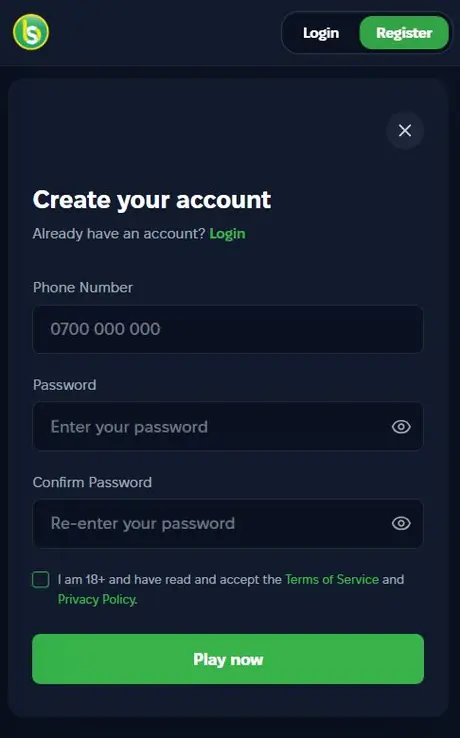
- Tap Login or Register in the top right corner.
New players register with an M-Pesa phone number and a password. Then they tick the 18+ box and tap Play now. The KSh 20 Welcome Stake shows up in the balance right after sign-up. Android may show a Google Play Protect notice, because the app comes from outside Google Play. If the file came from spurbets.com, it is fine to carry on.
Section 03
Spurbets on Your iPhone
Spurbets has no iOS app, but iPhone players do not miss out. The mobile website in Safari has the same games, promotions and M-Pesa wallet as the Android app.
A home screen shortcut turns the site into a one-tap icon:
- Open spurbets.com in Safari.
- Tap the Share icon at the bottom.
- Choose Add to Home Screen.
- Tap Add.
The Spurbets icon then sits next to the other apps. The site updates on its own, so there is never a new version to install.
Section 04
Spurbets App Sections
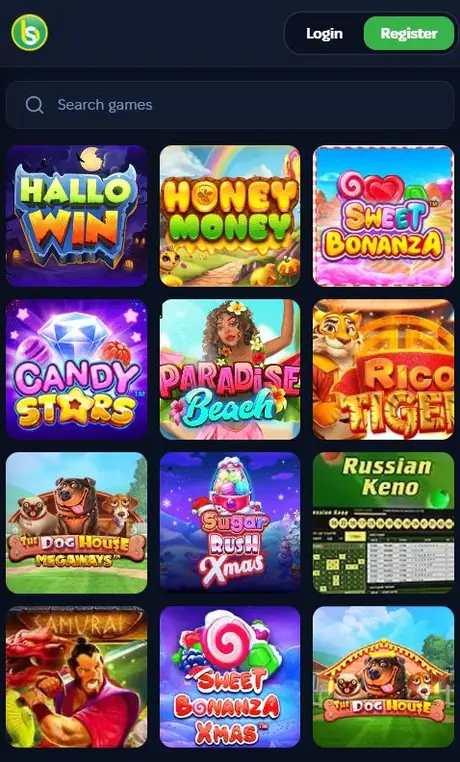
The Spurbets app has every section of the website. It includes crash games, slots, live casino, sports, jackpots, virtuals and roulette. The side menu lists them all, along with Promotions and Live Support.
The game lobbies show three square tiles per row on a phone screen. A "Search games" bar at the top finds any title in seconds.
Aviator and Other Crash Games
Crash games are the big favourite on Spurbets. Every title in the "Top 6 games in Kenya" block is one of them. In a crash game, the player places a bet, watches the multiplier climb and cashes out before the round ends.
- Aviator
- JetX
- Crash 1917
- Crash Royale
- Aviatrix
- FootballX
Aviator by Spribe has an RTP of 97%. RTP (return to player) is the share of all bets a game pays back over a long run. Aviator players also share KSh 100,000 in daily unwagered freebets. Crash Royale and JetX run weekly tournaments with KSh 5,000,000 in total prizes.
Slots and Live Casino Tables
The app carries the full slots lobby and the live casino with real dealers.
| Section | Highlights in the app |
|---|---|
| Slots | Sweet Bonanza, Sweet Bonanza Xmas, The Dog House Megaways, Sugar Rush Xmas, Candy Stars, Rico Tiger |
| Live casino | Blackjack, Speed Blackjack, Sly Blackjack, Baccarat, Andar Bahar, Richie Wheel, Keno |
Live tables stream video in real time. Wi-Fi or a 4G connection keeps the picture smooth.
Sportsbook and Live Betting
The app sportsbook covers football, basketball, tennis, ice hockey, volleyball and boxing. A row of round sport icons runs across the top of the screen.
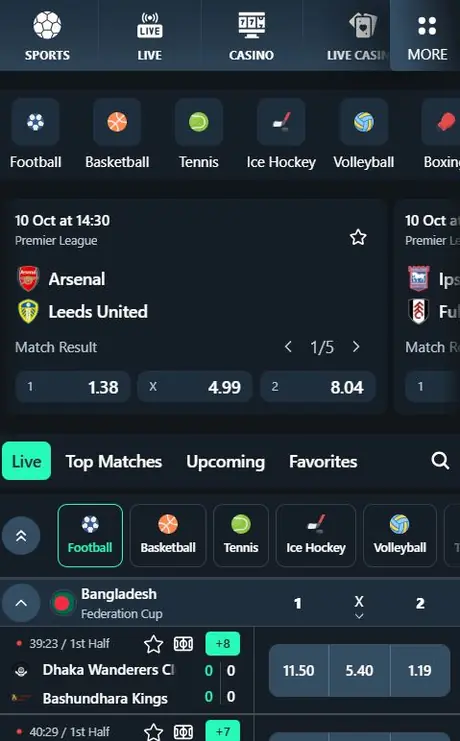
Odds are in decimal format. A KSh 100 bet at 1.38 returns KSh 138. In the Live tab, each match shows the clock, the score and a green counter of extra markets, such as +8 or +15.
- Live, Top Matches, Upcoming and Favorites filters
- Star icon to save a match to Favorites
- Premier League fixtures with 1X2 odds
- Live tennis from ATP and WTA events
Jackpots, Virtuals and Roulette
Jackpots, virtuals and roulette each have their own spot in the app menu.
| Section | What players find there |
|---|---|
| Jackpots | Games with prizes that grow from bets |
| Virtuals | Simulated matches with new rounds every few minutes |
| Roulette | Number and colour bets |
All three accept the KSh 20 Welcome Stake. Virtuals are handy late at night, when real matches are done for the day.
Section 05
Your M-Pesa Payments in the App
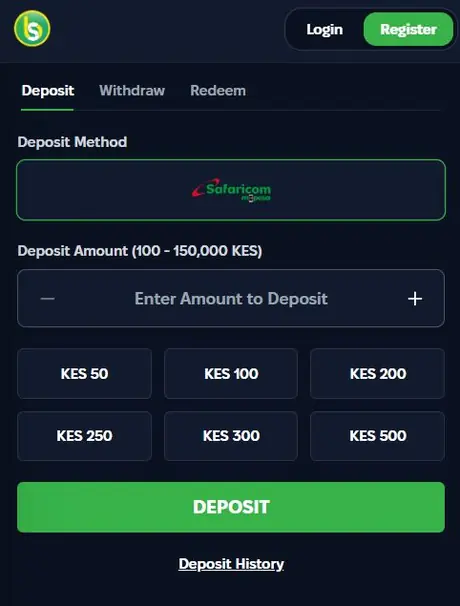
All payments in the Spurbets app run through Safaricom M-Pesa. The wallet has three tabs: Deposit, Withdraw and Redeem. The M-Pesa logo is already selected in a green frame.
| Payment | How it works | Limits |
|---|---|---|
| Deposit | Enter an amount, tap DEPOSIT, confirm with your M-Pesa PIN | KES 100 to KES 150,000 |
| Withdrawal | Enter an amount, tap WITHDRAW | From KES 100 |
| Redeem | Enter a voucher or promo code | Depends on the code |
The Deposit tab has quick tiles for KES 100, 200, 250, 300 and 500. The Withdraw tab has Min, 25%, 50% and Max buttons. Withdrawals go to the registered M-Pesa number once the account is verified. Deposits also count toward the 10% daily cashback on lost bets.
Section 06
Spurbets App Updates
To update the Spurbets app, download the latest APK from spurbets.com and install it over the old one. The account stays exactly as it was, because all data is stored on the Spurbets account.
- Open spurbets.com and tap Download App.
- Open the new APK.
- Tap Install or Update.
- Open the app and log in if asked.
There is no need to delete the old version first. Android swaps it out during the install.
Section 07
Spurbets App Problems and Solutions
Most app hiccups come from Android settings, phone storage or the network. Each one is quick to fix.
| Problem | Quick fix |
|---|---|
| Install blocked | Allow your browser to install unknown apps |
| App closes on launch | Install the latest APK |
| Games load slowly | Switch to Wi-Fi or 4G |
Blocked APK Installation on Android
If Android blocks the install, the browser does not have permission to install unknown apps yet.
- Open Settings.
- Go to Apps, then Special app access, then Install unknown apps.
- Choose Chrome and switch on "Allow from this source".
- Open the APK again and tap Install.
If Android says "App not installed", free up some storage and download the APK again.
App Crash on Launch
If the app closes right after opening, the installed file is usually out of date or damaged. A fresh install from spurbets.com fixes it.
- Download the latest APK from spurbets.com.
- Install it over the current version.
- Restart the phone if the app still closes.
- Open Spurbets and log in.
The balance and bonuses stay safe through a reinstall.
Slow Game Loading on Mobile Data
Slow loading is almost always a connection issue. Crash games and slots load quickly. Live casino streams video, so it needs more data.
- Check that the data bundle is active.
- Move to a spot with a stronger signal.
- Connect to Wi-Fi for live dealer tables.
- Close other apps that use data in the background.
Section 08
Spurbets Support for App Problems
Spurbets support is open 24/7 by phone, by email and through Live Support inside the app.
| Channel | Contact |
|---|---|
| Phone | 0720006699 |
| [email protected] | |
| In the app | Live Support in the side menu |
It helps to mention the phone model and what happens when the app opens. A screenshot of the error makes the fix even faster.
Section 09
FAQ
Is the Spurbets App Free?
Yes. The Spurbets APK is free to download.
Where Can I Download the Spurbets APK?
From the Download App button on spurbets.com, and only there.
Is the Spurbets App Available on Google Play?
No. Spurbets offers its Android app as an APK on the official website.
Can I Use Spurbets on My iPhone?
Yes. iPhone players use the mobile website in Safari, and it has all the same features.
Do I Need a New Account for the App?
No. You log in with the same phone number and password you use on the website.
Is the Spurbets APK Safe to Install?
Yes, when you download it from spurbets.com. Spurbets holds BCLB licence BK0000687.